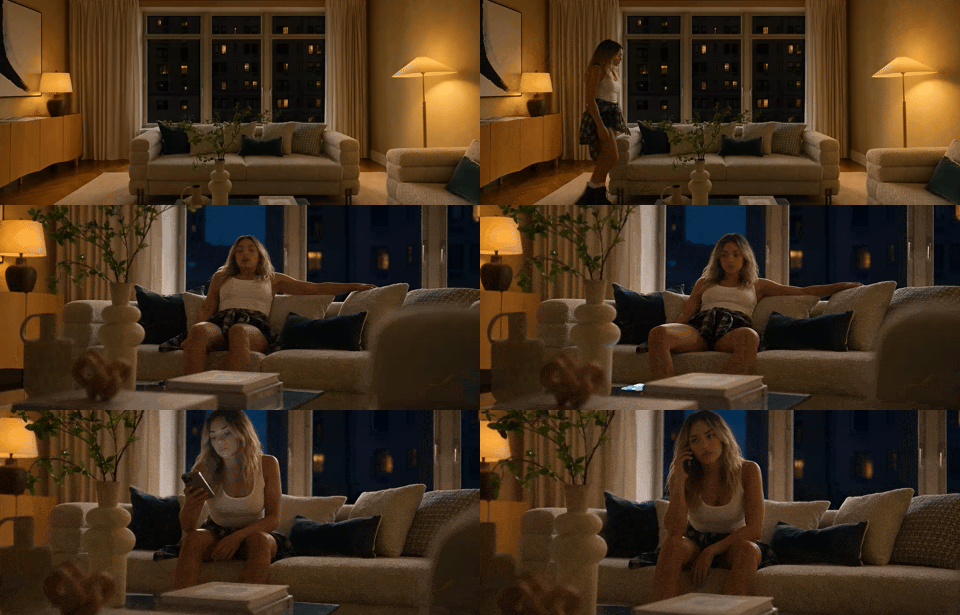

Imagine walking through your home, calling your child's name, and hearing nothing in return.
You check the bedroom. The hallway. The kitchen. Every second without an answer makes the silence harder to bear.
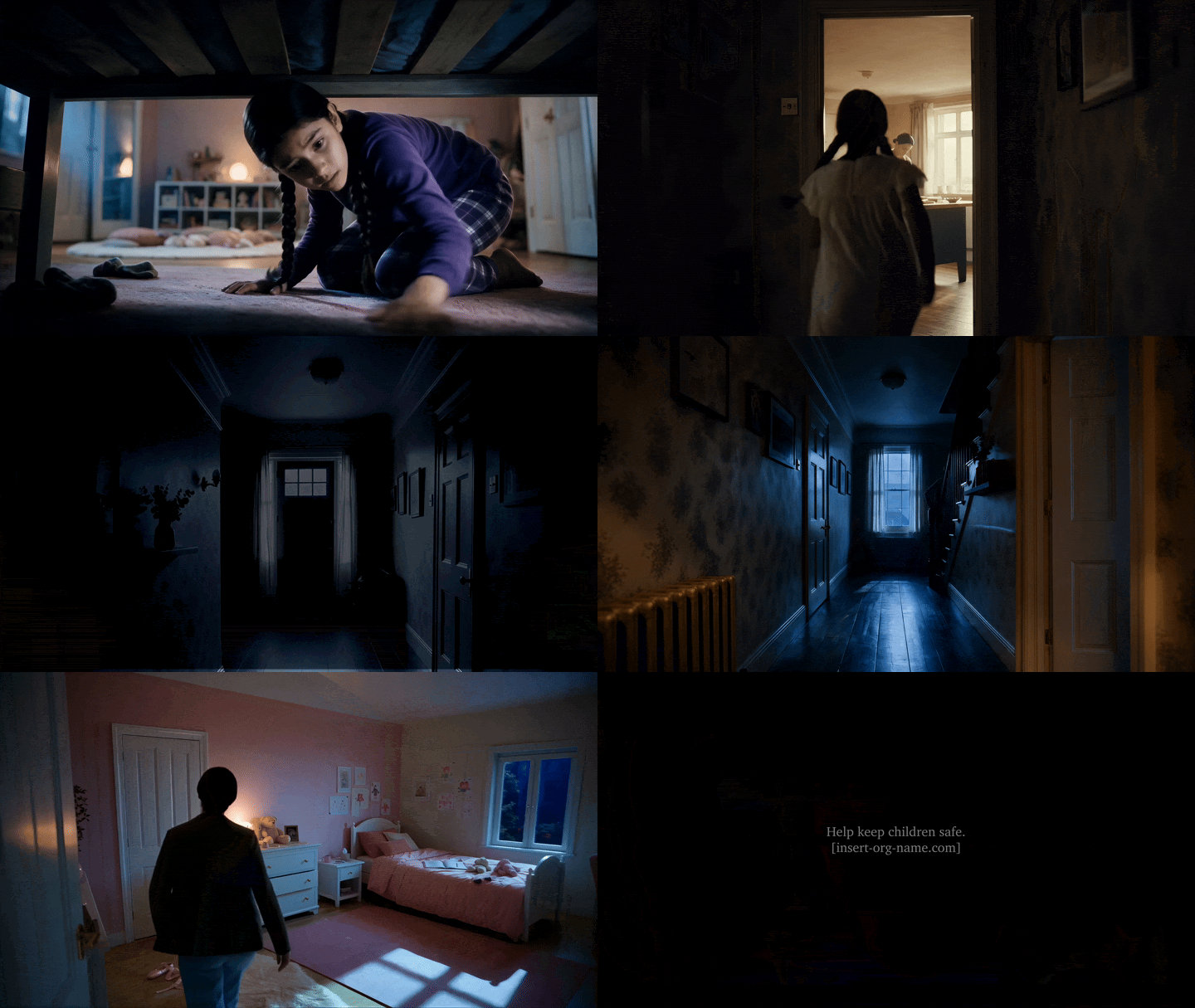
It's a familiar fear that creative director Phyl Bautzer turned into Doors, a cinematic AI concept film developed as his final project for Lighthouse AI Academy's Figma Weave Live Studio.

With about 18 years in advertising and more recent nonprofit experience, Phyl brought his storytelling, strategy, and art direction expertise to AI filmmaking.
His self-initiated 60-second film explores human trafficking, a cause he cares deeply about.
Set inside one family home, the story unfolds in two acts. First, a young girl searches for misplaced belongings, opening doors to find her mother nearby. Then the roles reverse, as the mother searches desperately for her daughter.
The film ends with relief, but its emotional weight remains.
For Phyl, the challenge went beyond creating convincing shots.
The characters, rooms, and doors needed to remain consistent throughout the story.
He knew exactly what he was aiming for:
I wanted to achieve a consistent, reliable workflow, not a lucky image.
He developed a connected production process in Figma Weave, combining system prompts, AI agents, reference images, and carefully planned environments.
Here's how he developed it.
The Workflow Phyl Designed to Create Doors
1. From Script to Storyboard
Phyl began with the script, turning the story into a sequence of shots that could guide production.
Inside Figma Weave, he built a storyboard system using a prompt-building assistant shared by Lighthouse mentor Raoni Lima, which Phyl calls the architect.
The architect helps create system prompts that guide AI agents through specific tasks.
For the storyboard, an LLM analyzes the script, character references, and visual style to produce individual scene prompts. These are separated by ++ and organized into a list using an Array node.
Initially, generating scenes separately caused inconsistencies in style and image proportions. Phyl instead combined them into one prompt for ChatGPT Images 2.0, producing a unified storyboard.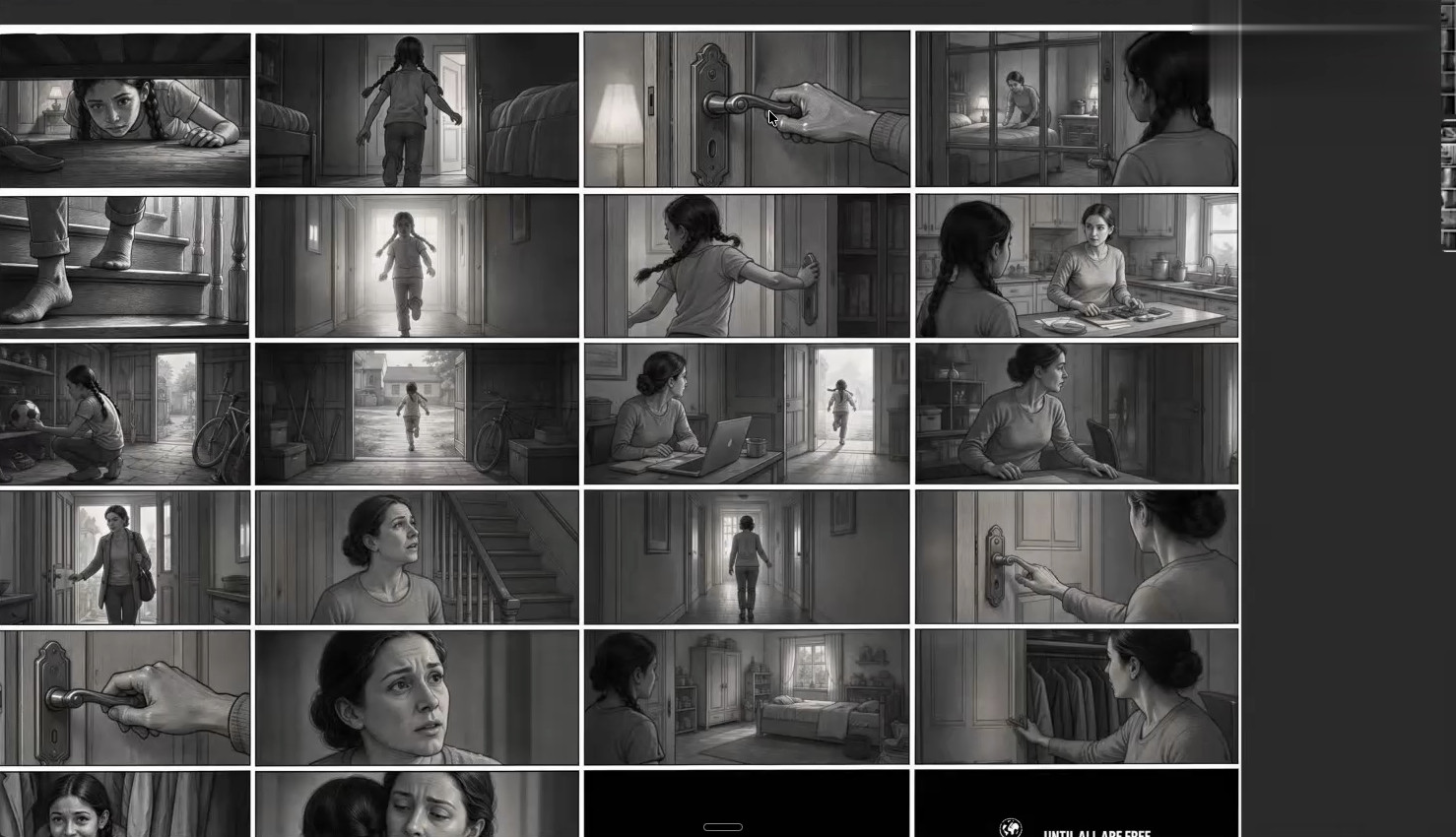 The result still needed correction. One character appeared with three feet, which Phyl fixed using a Crop node and a targeted editing prompt.
He also tested a multi-cut video system, but inconsistent characters, lighting, and door movements showed that further refinement was needed.
The lesson was clear: a reliable workflow needs room for correction, not just generation.
Key Actions:
Build a storyboard system using the architect and an AI agent.
Convert the script into scene prompts using ++ separators and an Array node.
Generate a unified storyboard and correct individual frames.
Test the sequence before final production.
2. Creating the Characters and Their Wardrobe
With the storyboard established, Phyl turned to casting.
Phyl required two recurring characters: a mother and her daughter, Laura.
To maintain their appearance, he built a Character Sheet system that generates eight-panel references: four facial views or expressions and four full-body views.
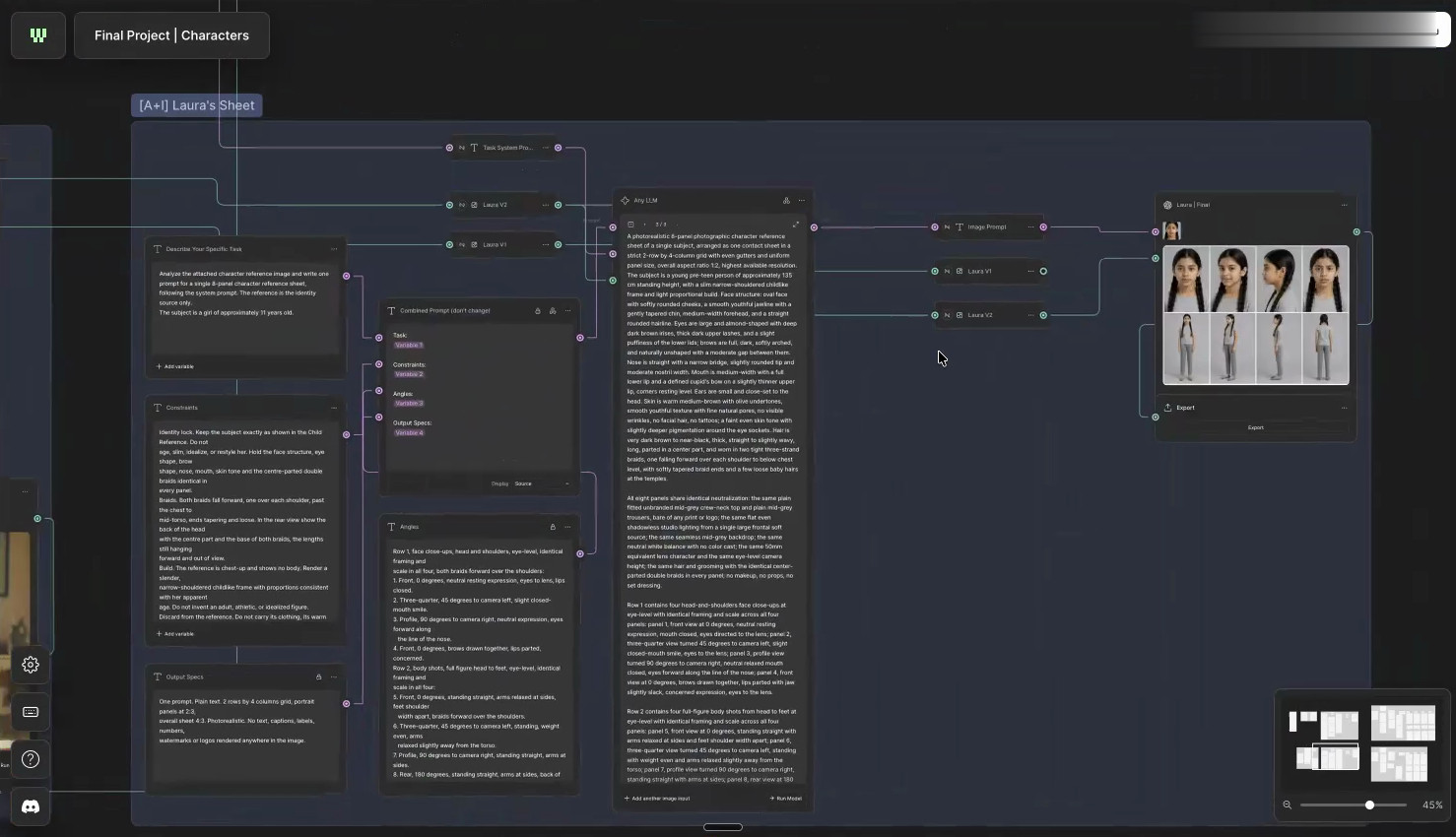 Using reference images, descriptive instructions, and constraints, he defined the mother's face and hair, then reused the system to create Laura's sheet.
During the process, he realized that complicated prompt-building wasn't always necessary.
I was over-engineering things and didn't trust my own prompting. At the end of the day, my own prompting works really well because it's specific to what I want.
Building the Wardrobe
Because the story unfolds across four days, wardrobe continuity was another priority.
Phyl created a Wardrobe system that analyzes clothing references and generates isolated garments against a plain background.
An agent prepares prompts for the mother's outfits across Days A to D, along with Laura's pajamas and other clothing.
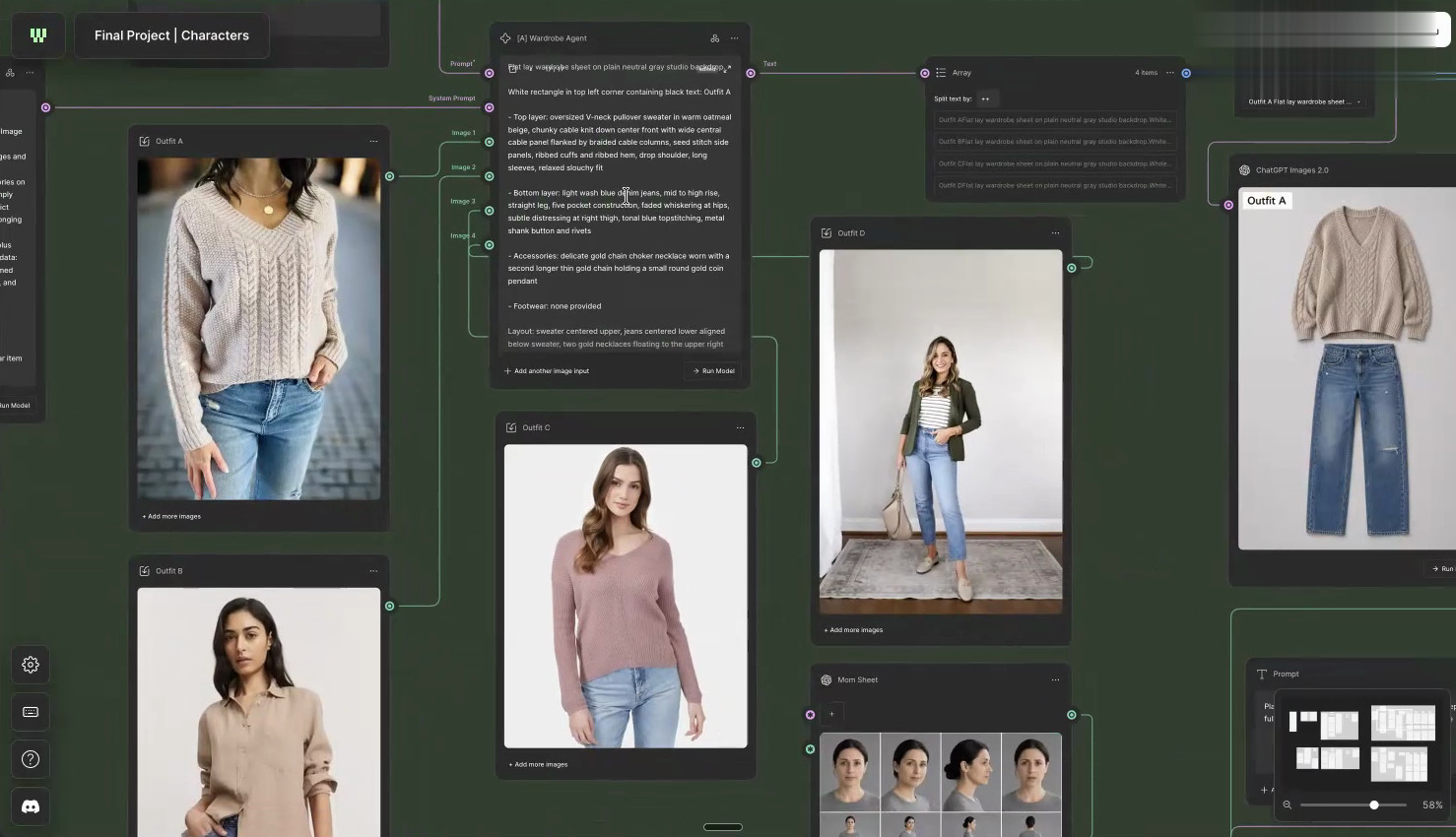 These garments are applied to the character references for later shots.
Phyl discovered that missing details could still cause problems. When footwear wasn't specified, AI invented shoes, prompting him to add more explicit instructions.
That's the type of control that I wanted in my film, because I didn't want AI to interpret things that I hadn't decided.
Key Actions:
Generate reusable eight-panel character sheets.
Establish consistent facial and physical references.
Create wardrobe references for all four days.
Specify missing details before generating shots.
3. Building the World: Why the Wall Map Changed Everything
Creating a consistent house was one of the biggest challenges in Doors.
The same rooms needed to appear from different camera angles and under changing lighting conditions.
Phyl began with a CCTV-style high-angle view, a technique introduced during the Figma Weave course.
Using Compositor, he combined references to create an orthographic room view. He also explored World Labs' Marble to create a near-3D reconstruction from an image and obtain an opposite camera angle.
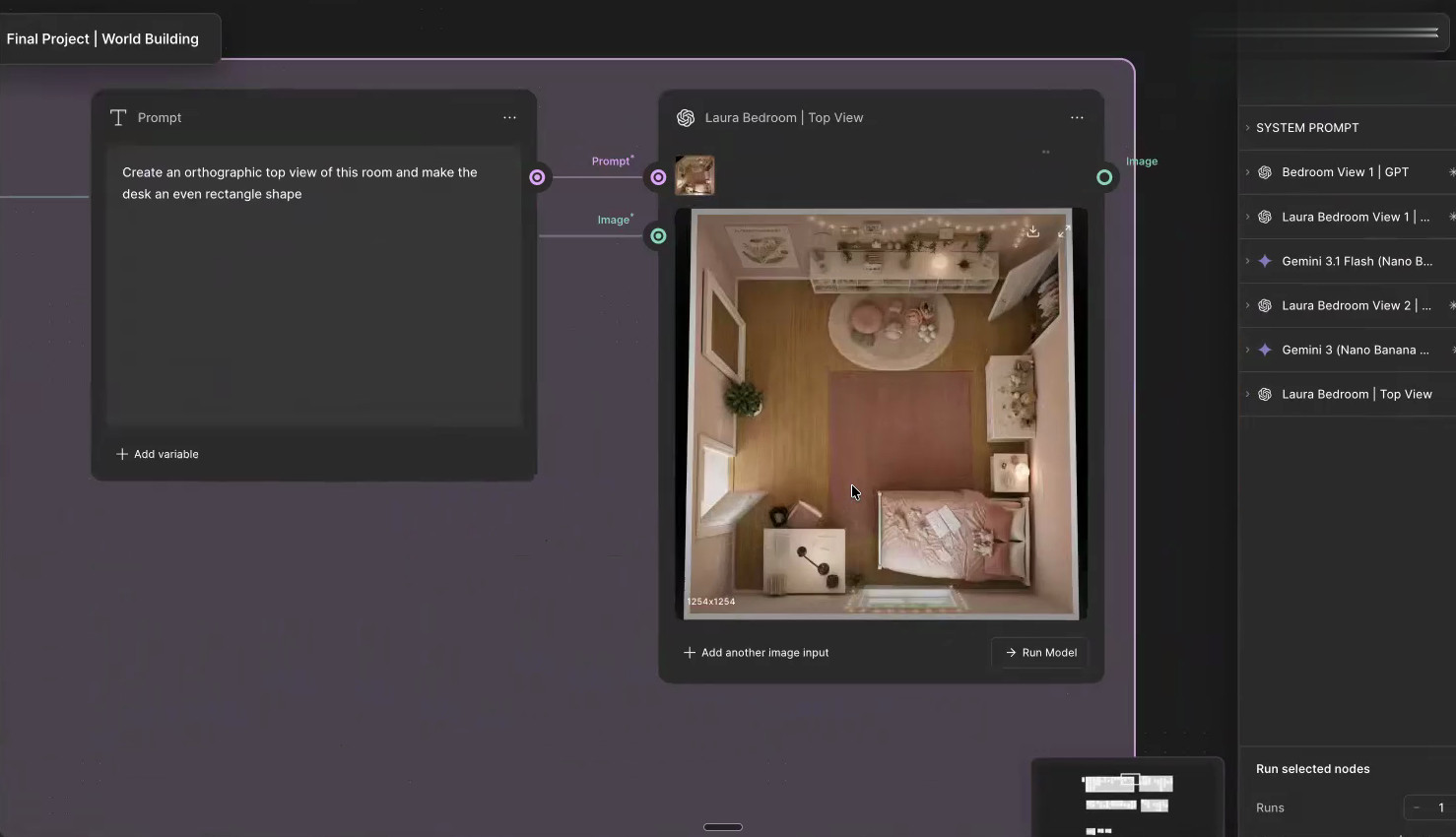 But the results weren't always convincing. Some rooms looked unnaturally perfect, while others had architectural inconsistencies.
As Phyl explains:
AI has a tendency to make things very perfect. So I had to specify that nothing is perfectly aligned, that furniture sits slightly off axis, so it feels like somebody's living in it and not a curated image.
Creating the Wall Map
Phyl eventually found a simpler approach: supplying a basic wall map alongside a visual reference.
The reference established the atmosphere and style. The map specified where furniture, doors, windows, and other architectural elements belonged.
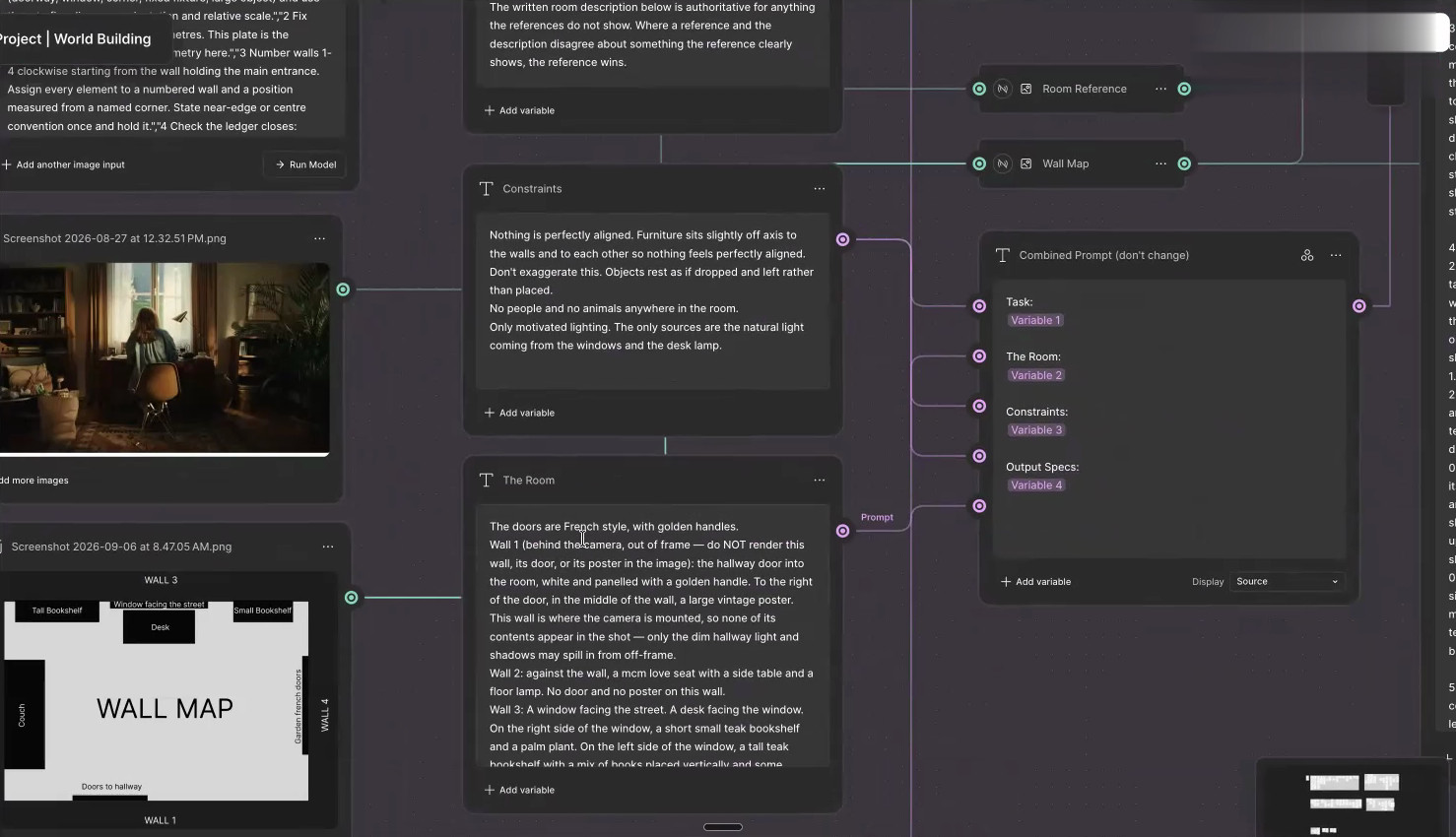 For the mid-century office, he mapped the desk, couch, bookshelves, and French doors.
The reference established the room's mood and style, while the wall map defined its physical layout.
Within approximately four or five generations, he had an office he was happy with.
He then used the same technique for the mother's bedroom. The map also helped address earlier errors, including a mirror being mistaken for a doorway.
Changing the Light Without Rebuilding the Room
The story required environments to transition between daylight, evening, and night.
Phyl developed relighting agents using room descriptions, references, and lighting instructions to generate different versions of the same space.
Laura's scenes received an evening treatment, while the mother's search used moonlight for a darker atmosphere.
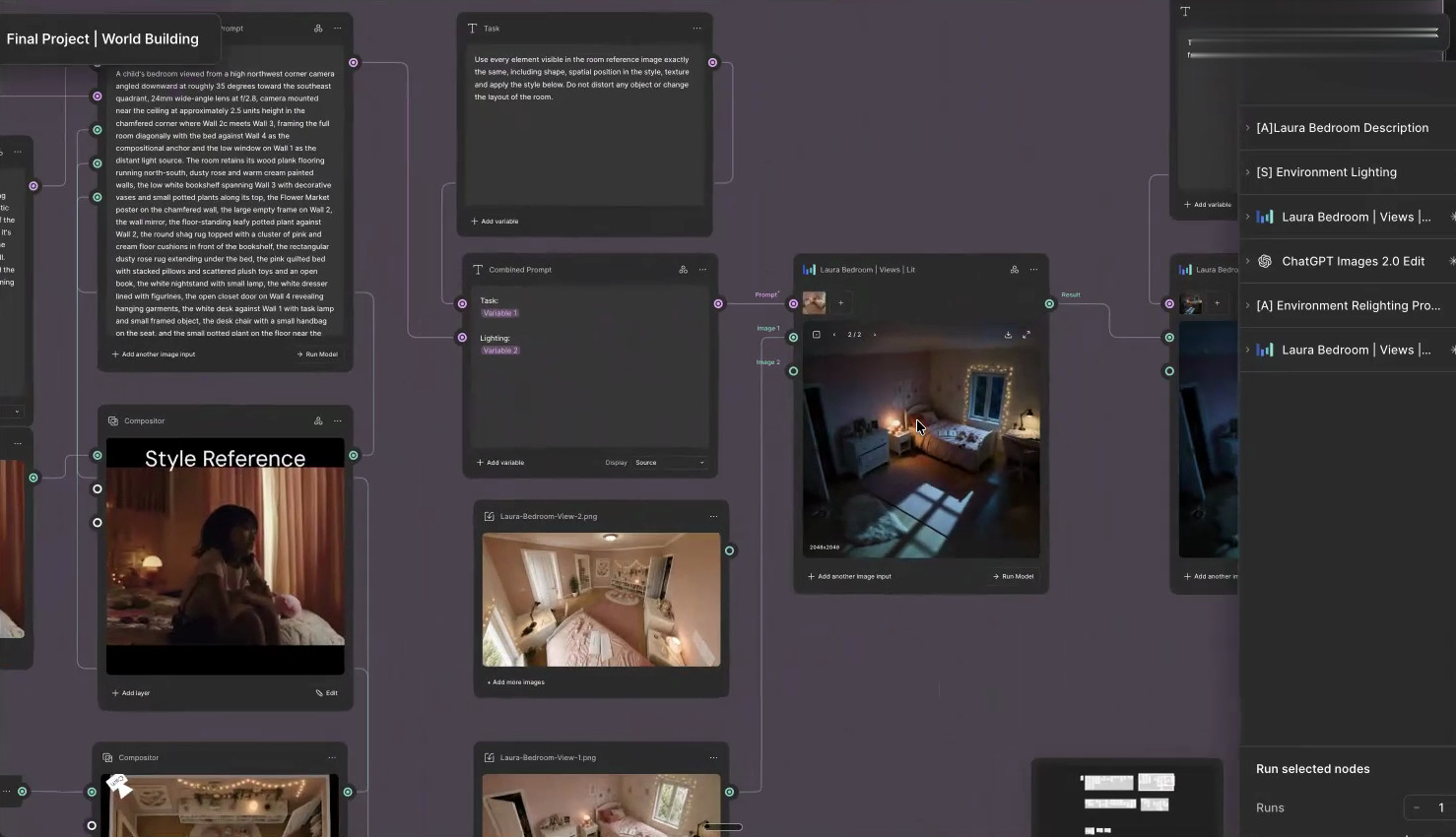 Not everything worked immediately. Phyl realized that planning the lighting earlier in the world-building process could have prevented problems later.
Key Actions:
Build rooms using visual references and orthographic views.
Use wall maps to control furniture and architectural layouts.
Generate different lighting treatments for the same environment.
Plan lighting alongside world building to reduce later corrections.
4. From Storyboard to Cinematic Stills
With the characters, clothing, and environments established, Phyl began creating the individual shots.
He organized his approved references into an asset library, then used Claude to help translate the script into detailed shot descriptions covering composition, camera position, movement, set dressing, and atmosphere.
Inside Compositor, an orthographic room view helped indicate the camera position and the direction characters should face.
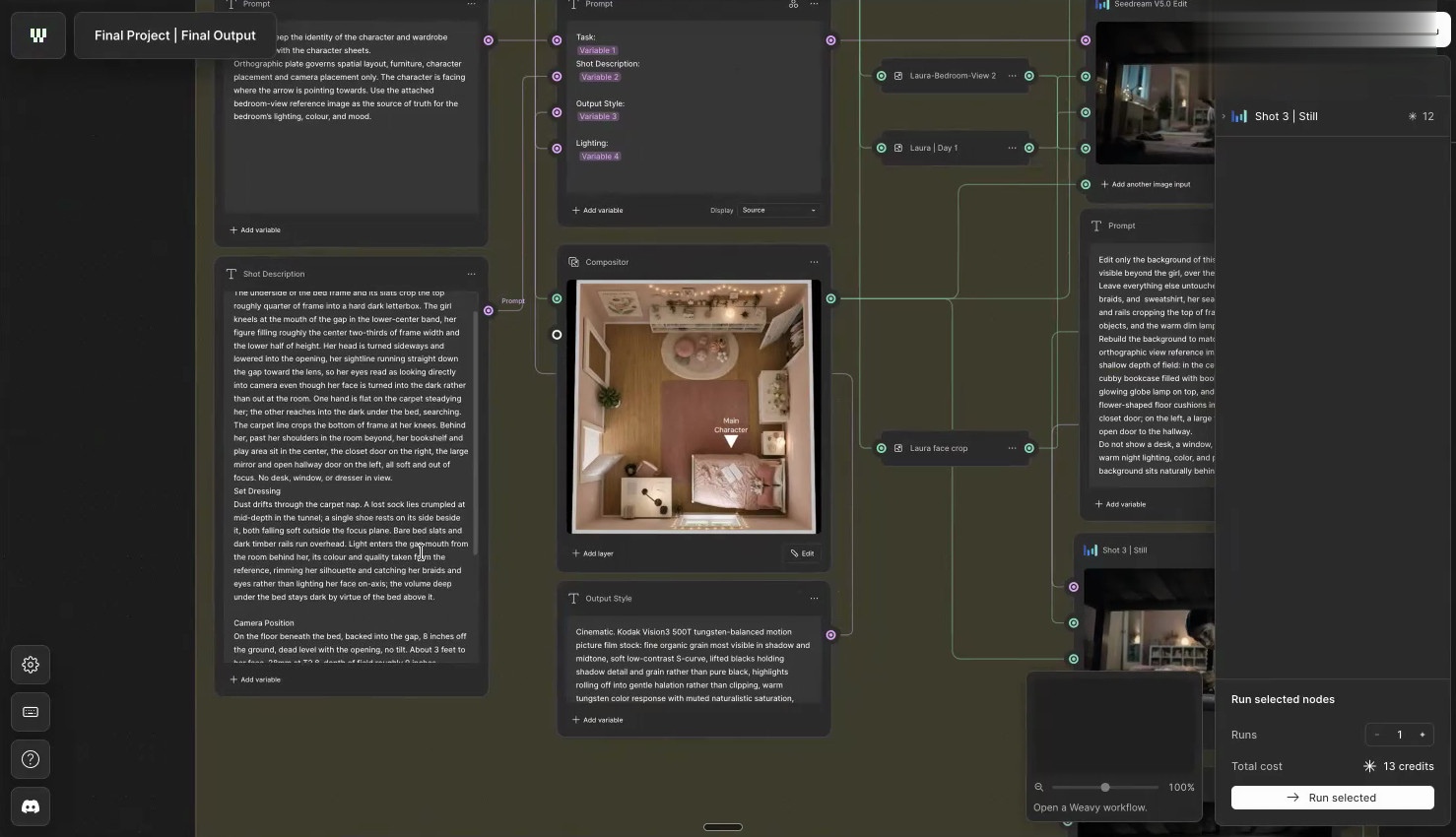 This helped reduce continuity errors, such as characters unexpectedly appearing on the opposite side of a room.
Phyl initially tested ChatGPT for image generation before choosing Seedream for his preferred stills.
Adding the Film Treatment
Phyl specified Kodak Vision3 500T film stock for an analog aesthetic.
When some images still looked too sharp and computer-generated, he used Gen Effect to add grain and soft focus, lift the blacks, and mute the highlights.
I thought the image was a little bit too sharp and almost CG-like. So I added a soft focus and some grain, lifted the blacks, muted the highlights, and it immediately starts to feel a little bit more real.
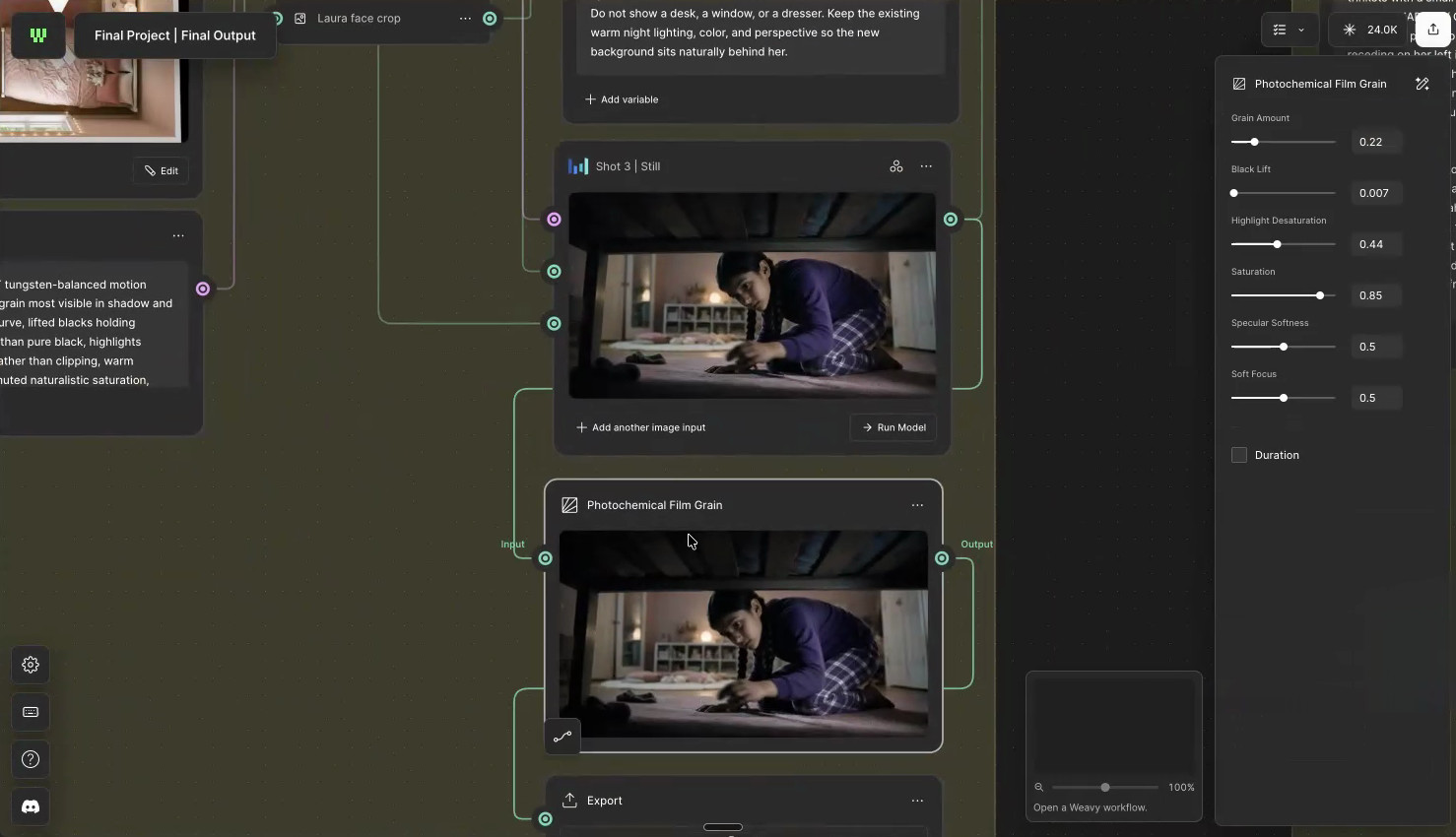 These finished stills became the references for video generation.
Key Actions:
Organize characters, wardrobe, and environments into an asset library.
Create structured shot descriptions with Claude.
Define camera and character positioning.
Generate stills and apply a consistent photographic treatment.
5. Generating the Film and Solving the Problems
The final stage transformed Phyl's stills into moving images.
He created a single-clip system that combines a shot description, reference still, and camera instructions into a prompt for Seedance 2.0.
He also developed a multi-cut system for connected actions where movement needed to continue across multiple shots.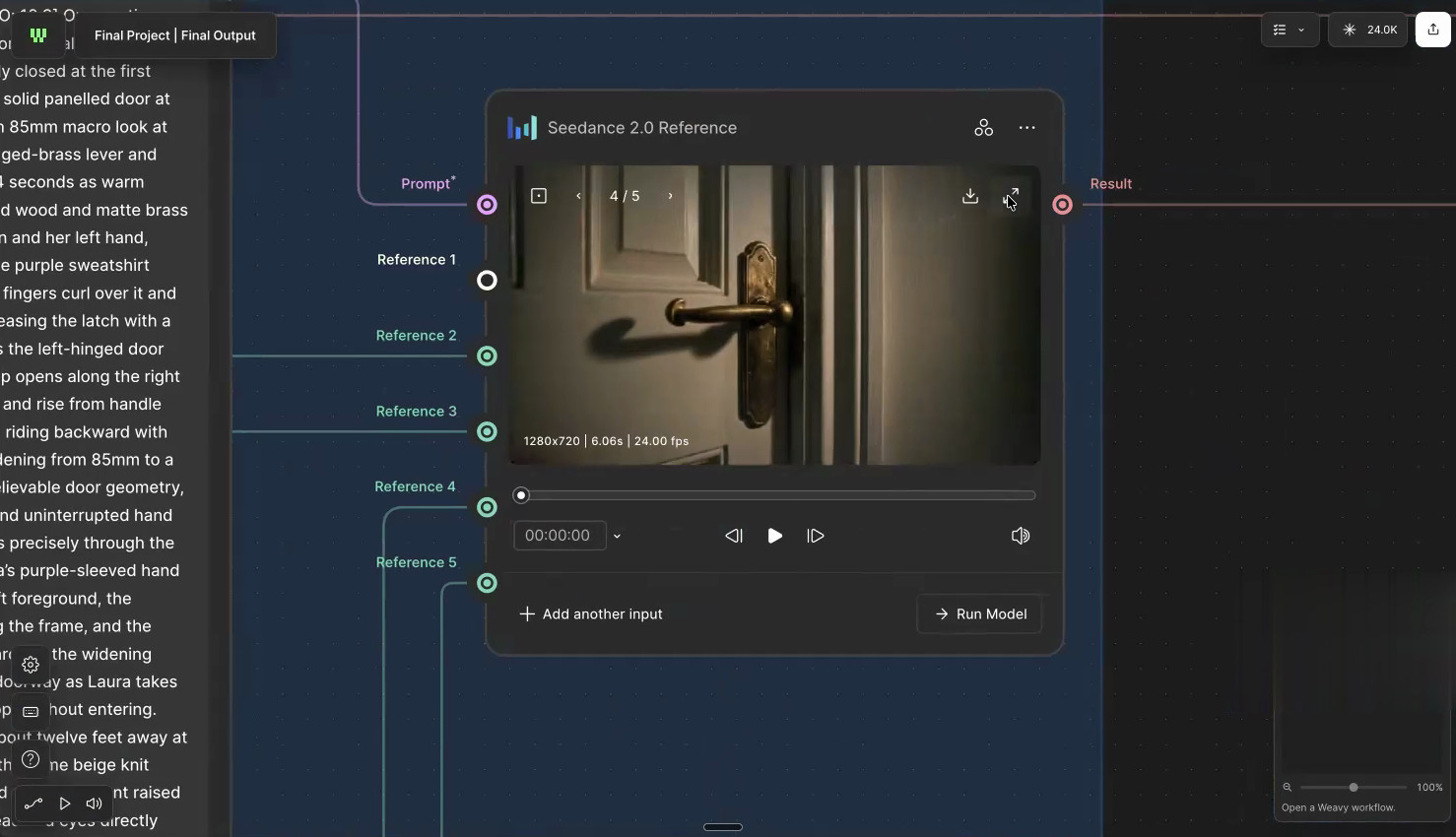 The results weren't always predictable.
In one sequence, the model struggled with a door's movement and changed its handles between shots. Another scene on the staircase became awkwardly slow because of the model's minimum clip duration.
Some issues required repeated generation or different ways of assembling the footage; others remained unresolved.
But Phyl learned that an imperfect generation could still contain something useful.
It's not a perfect generation, but, like Raoni taught us, even if it's not perfect, there's parts of it that you can use.
For an under-the-bed sequence, he kept only the moment Laura ran out of the room.
Rather than forcing every generation into a complete shot, he selected the moments that served the story.
Key Actions:
Generate individual clips using approved references.
Use multi-cut generation for connected actions.
Review continuity and identify usable footage.
Refine and assemble the strongest moments into the film.
Why It Matters
Phyl's project demonstrates how much of AI filmmaking happens before the final video is generated.
Storyboards establish the narrative, character and wardrobe references maintain continuity, and wall maps preserve the layout of each room.
The innovation wasn't a single model or image, but how Phyl organized these decisions into a repeatable production process.
His wall-map technique is particularly accessible. A simple drawing, paired with a visual reference, can provide clearer spatial instructions than lengthy descriptive prompts.
The process wasn't flawless: camera movements, lighting, and architectural details sometimes changed unexpectedly.
But rather than ignoring these problems, Phyl used them to identify where his workflow needed improvement.
Five Lessons Creative Professionals Can Take from Doors
Phyl's project offers several ideas worth applying to your own work:
Plan the scene before generating: Use a storyboard to establish the sequence and purpose of each shot.
Lock your references early: Characters, wardrobe, and environments need a consistent starting point.
Draw the room: A simple wall map can clarify doors, furniture, and camera positions.
Don't over-engineer every prompt: Specific instructions and strong references can be more useful than unnecessary complexity.
Learn from imperfect outputs: A failed generation may reveal a workflow problem or contain a moment worth keeping.
These lessons extend beyond filmmaking to advertising, visual storytelling, and other creative production workflows.
From a Concept Film to a Repeatable Workflow
Although Doors was developed as a single concept film, Phyl's ambition was broader.
Like the Lighthouse student team behind Trace of One, Phyl approached AI filmmaking as a connected production process rather than a series of isolated generations.
He wanted to create systems he could return to for future projects.
By separating tasks into individual agents and structured processes, he can reuse parts of the production workflow with a different script, set of characters, or visual direction.
For future projects, Phyl identified opportunities to simplify prompts, establish stronger visual references, plan lighting earlier, and improve connected-shot generation.
The aim isn't to eliminate experimentation.
It's to make each experiment more informed, so fewer resources are spent repeatedly solving the same problems.
Phyl's project is a reminder that creative experience remains essential when working with AI. His understanding of narrative tension, art direction, and production planning informed every major decision.
The tools helped him develop and test those decisions; they didn't make them for him.
Learn with Lighthouse: Turn Creative Knowledge into Practical AI Workflows
At Lighthouse AI Academy, we help creative professionals connect their existing expertise with emerging AI tools.
Phyl’s creation shows how storytelling, art direction, and production planning can inform the way an AI workflow is built.
From storyboards to room layouts and cinematic lighting, his work demonstrates that meaningful results depend on more than choosing the right model.
The creator's judgment remains central to the process.
And that's how we teach our students about:
USING AI TO ENHANCE, NOT REPLACE.
View our courses now and learn to turn your creative expertise into practical AI workflows.
Any questions or comments about the article?
Message us at support@lighthouseacademy.ai and let us know your thoughts.