
Creative production doesn’t usually fail because of a lack of ideas.
It fails because ideas can’t survive the jump into something usable: something consistent, controllable, and repeatable enough to support real commercial work.
That gap between experimentation and production is exactly what Lighthouse alum Dario van Houwelingen set out to close.
What began as a test inside ComfyUI evolved into a full visualization system: a tool designed to help marketing and design teams generate campaign-ready product concepts from 3D assets, with lighting, composition, and photographic realism baked into the workflow. The goal wasn’t novelty. It was utility: a pipeline that holds up under the needs of brand teams who want speed, variation, and creative control without sacrificing quality.

1. Build the Dataset Like a Photographer
Before any training run, Dario treated the dataset as the real foundation of the system because in product visualization, the data is the camera.
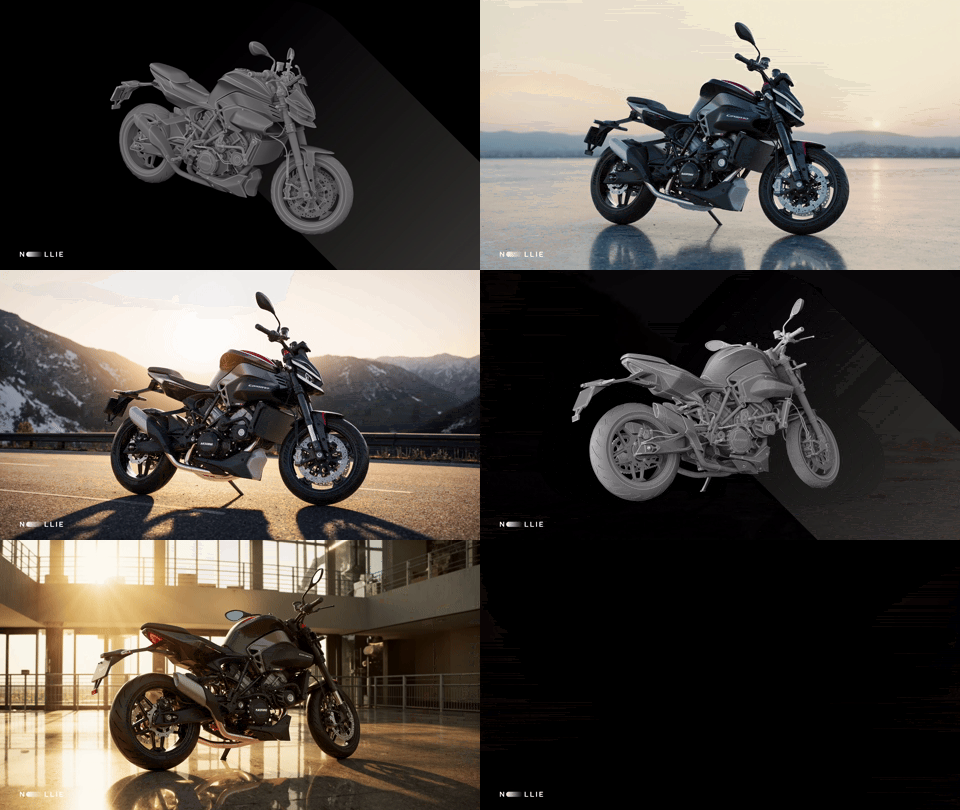
He built a complete 3D dataset himself by modeling and rendering a** high-end motorcycle** across dozens of camera angles, environments, and lighting setups, using more than 20 backplates and HDRIs in total. The point wasn’t just variety for variety’s sake. It was to capture behavior: how a subject holds its form under shifting light, how surfaces respond, how shadows fall, how realism stays consistent across angle changes.
Dario explains:
I created a large image dataset using photorealistic 3D rendering… different angles, components, and lighting situations for a diverse dataset.
This dataset functioned like a visual fingerprint and something that could anchor both consistency and variation. It’s also why the project leans toward production-grade outcomes: high-quality output starts with high-quality assets, and product visualization tends to punish shortcuts.
2. Train for Detail, Not Just Style
Once the dataset was prepared (including captioning and refinement), Dario ran multiple training experiments. The goal wasn’t simply to teach a model a “look.” It was to preserve fine surface detail while keeping enough flexibility for creative direction.
I did several training runs and optimized the parameters. I landed on a LyCORIS model, which retained the most details of this complicated subject.
— Dario
That detail retention matters. Product visualization lives and dies in the small stuff: edges, reflections, materials, micro-contrast, surface response, and the subtle cues that make an image feel photographed instead of fabricated. The model choice became the technical backbone that everything else could rely on.
3. Design an Adaptable ComfyUI Workflow
With a stable model in hand, Dario moved into what ComfyUI does best: building systems.
He developed a ComfyUI pipeline designed to balance deep control with usable guidance. Two parts of this were central
Camera and perspective control via custom ControlNet inputs rendered from the original 3D asset (so shots could maintain consistent viewpoint logic).
A Claude LLM node that expands short prompts into richer, production-grade phrasing, structured for T5XXL-ready text used with Flux.
Dario notes that:
The workflow integrates a Claude node that enhances user prompts into T5XXL-ready phrasing for Flux.
In practice, this turns the workflow into something closer to an art-directing assistant. A user can type a short concept, and the node expands it into language that is more likely to produce “studio-grade” output.
For example:
User input → “motorcycle on a mountain road.”
Claude expands it to → “[TRIGGERWORD], a sleek motorcycle resting on a winding mountain road at golden hour, chrome reflecting warm light, cinematic composition, 35mm lens, high contrast between cool shadows and sunlit peaks.”

The workflow converts vague intent into structured, production-ready input, while ControlNet-derived guidance keeps outputs anchored in controllable camera logic.
This is where the system starts feeling less like “generation” and more like visualization infrastructure: a pipeline where marketing teams aren’t expected to become prompt specialists to get good results.
4. Wrap It in an Interface Built for Humans
A workflow can be powerful and still fail the moment it leaves a builder’s machine. Dario’s next move was to make it usable by non-technical users because production tools win by being adoptable rather than clever.
With support from Lighthouse, the pipeline was deployed through a proprietary deployment system developed in-house: a cloud-based interface designed to feel approachable while preserving full structural control.
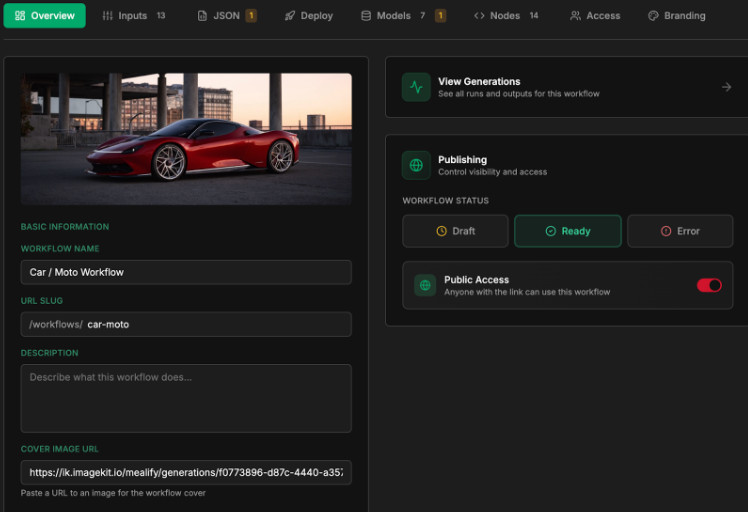
It includes icons for the camera angles, prompt presets enhanced by the LLM, and a resolution toggle for generation settings.
— Dario
This is a meaningful transition: the workflow stops being “a ComfyUI graph” and becomes an application-like experience that teams can interact with directly. The system remains structured, but the interface becomes the bridge that makes it usable in a real marketing or product environment.

And that shift (workflow to app) is often the difference between an impressive demo and a tool that can actually ship.
5. Test, Validate, and Ship
At this stage, the system moves out of theory and into usage. Dario’s workflow is now being tested with marketing departments and product studios, positioned as a rapid concepting tool for automotive, cosmetics, and consumer brands.

Dario explains:
We’re showing this to marketing departments that can benefit from rapidly creating concept imagery of their specific products.
And there are three key properties of the system as it enters real commercial testing:
Commercial safety and control: the system is described as keeping datasets and outputs under client control, with no data leaving their environment, supporting ownership and commercial security.
Creative control that matters: the workflow is built so teams can tune visuals (lighting, composition) while preserving brand fidelity.
High-quality output grounded in craft: the realism and precision are attributed to Dario’s background in 3D, photography, and production.
The emphasis is important: speed isn’t the headline. Control is. The system is designed to move quickly because it is structured, because the foundation is deliberate rather than improvised.
Why It Matters
It’s easy to treat “AI product visualization” like a novelty category. But Dario’s build points to something more durable: the rise of practical, controllable creative systems that marketing and design teams can actually use.
This project shows how a pipeline becomes commercially meaningful when it does a few things well:
Prioritizes detail retention for complex subjects.
Treats data like production (not just training material).
Wraps the complexity inside a human-friendly interface.
Moves into testing with real departments, with real needs.
Uses ComfyUI not as a playground, but as a system design environment.
Translates intent into production-ready language through an LLM node.
The larger signal is that AI workflows aren’t just personal experiments anymore. They’re becoming organizational tools; systems that can support brand work when they’re built with craft, iteration, and care.
When you treat the process as part of the craft, you can turn curiosity into something real… something human.
Learning From Dario’s Workflow
At Lighthouse AI Academy, we see Dario’s system as more than a single project. It’s a blueprint for how creative technologists can build tools that actually cross into production.
It demonstrates what happens when:
The dataset is treated like a real shoot (variation, realism, and surface behavior are captured deliberately).
LLMs are integrated as translators, turning rough intent into production-ready language.
The workflow is packaged for teams, so adoption isn’t limited to technical users.
ComfyUI is used as a system-building environment, not just a generator.
Training is optimized for detail rather than only style.
Testing is part of the build, not an afterthought.
If you can explain your process, you can share it, and if you can share it, you can build something that lasts.
From Experiment to Infrastructure
Dario’s visualization pipeline marks the point where experimentation becomes infrastructure.
What began as a ComfyUI test evolved into a system capable of supporting real marketing teams under real commercial constraints. The dataset was built with photographic discipline. The model was trained for surface fidelity, not aesthetic shortcuts. The workflow was engineered for control. The interface was designed for usability beyond the technical artist.
AI is not the defining feature of this project; structure is.
When datasets are treated like production assets, models behave predictably. When workflows are designed intentionally, iteration becomes strategic rather than chaotic. That’s how generative tools move from playground to production floor.
And that’s what this project ultimately demonstrates:
AI isn’t here to replace product visualization teams; it’s here to support better systems for building campaigns.
Learn with Lighthouse: Design Systems That Scale with Speed
That same mindset underpins how we teach at Lighthouse AI Academy: building workflows that move from concept to campaign, from prototype to pipeline, and, increasingly, from internal tools to fully deployed applications.
If you want to explore how structured systems like Dario’s translate into real creative and commercial advantage, our programs are curated to help you design workflows, not just prompts; systems, not just shots.
And when those systems are ready, we go further.
As demonstrated in Dario’s project, we also support the development and deployment of polished, user-facing applications, complete with intuitive UIs and production-ready infrastructure. Because building a powerful workflow is one thing.
Shipping it in a way that teams can actually use is another.
And we do this to help you start:
USING AI TO ENHANCE, NOT REPLACE.
View our courses now and build your own systems with purpose.
Any questions or comments about the article?
Message us and let us know your thoughts!